Nutrition tracking
from your terminal.
Track calories, macros, 50+ micronutrients, weight, and water — in your terminal, then synced to the web app and your phone. Lightning-fast, lightweight, and the only tracker that plays nice with your AI coding agent.
macOS, Linux, or Windows via WSL2.
A real nutrition tracker. From any terminal.
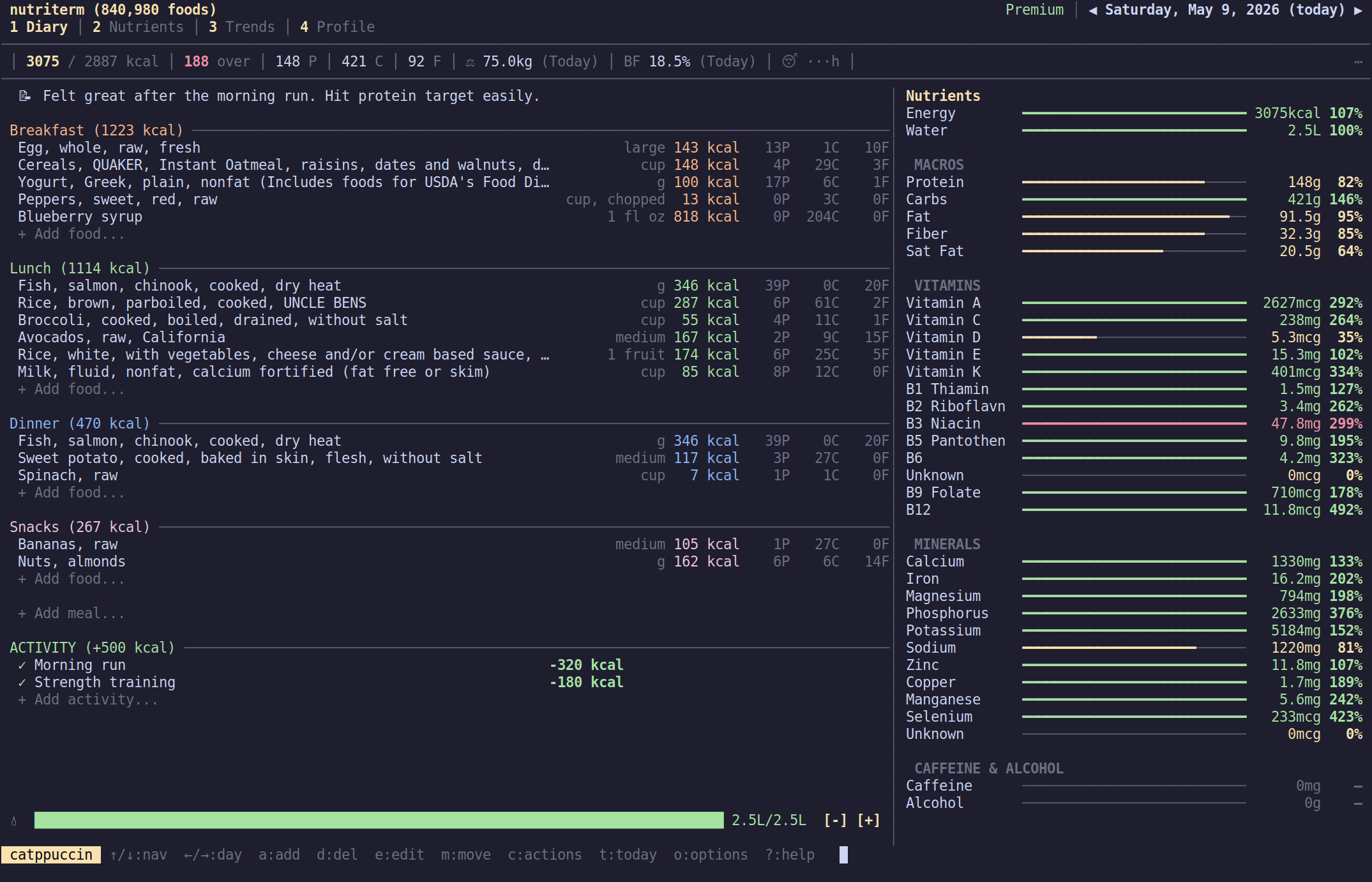
Diary, nutrients, trends, profile — all in your terminal.
Diary
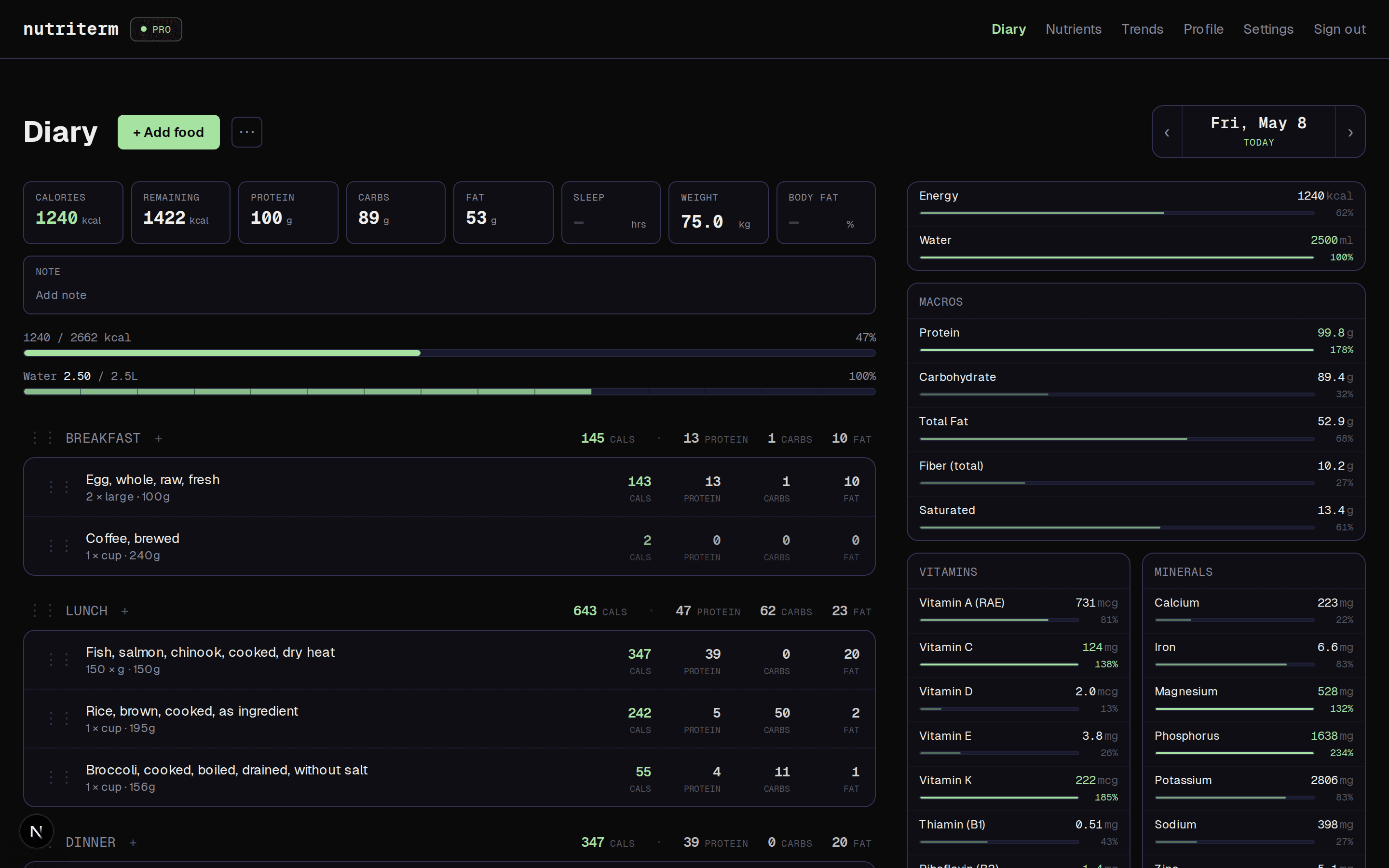
Meals, foods, water, macros, and nutrient sidebar at a glance.
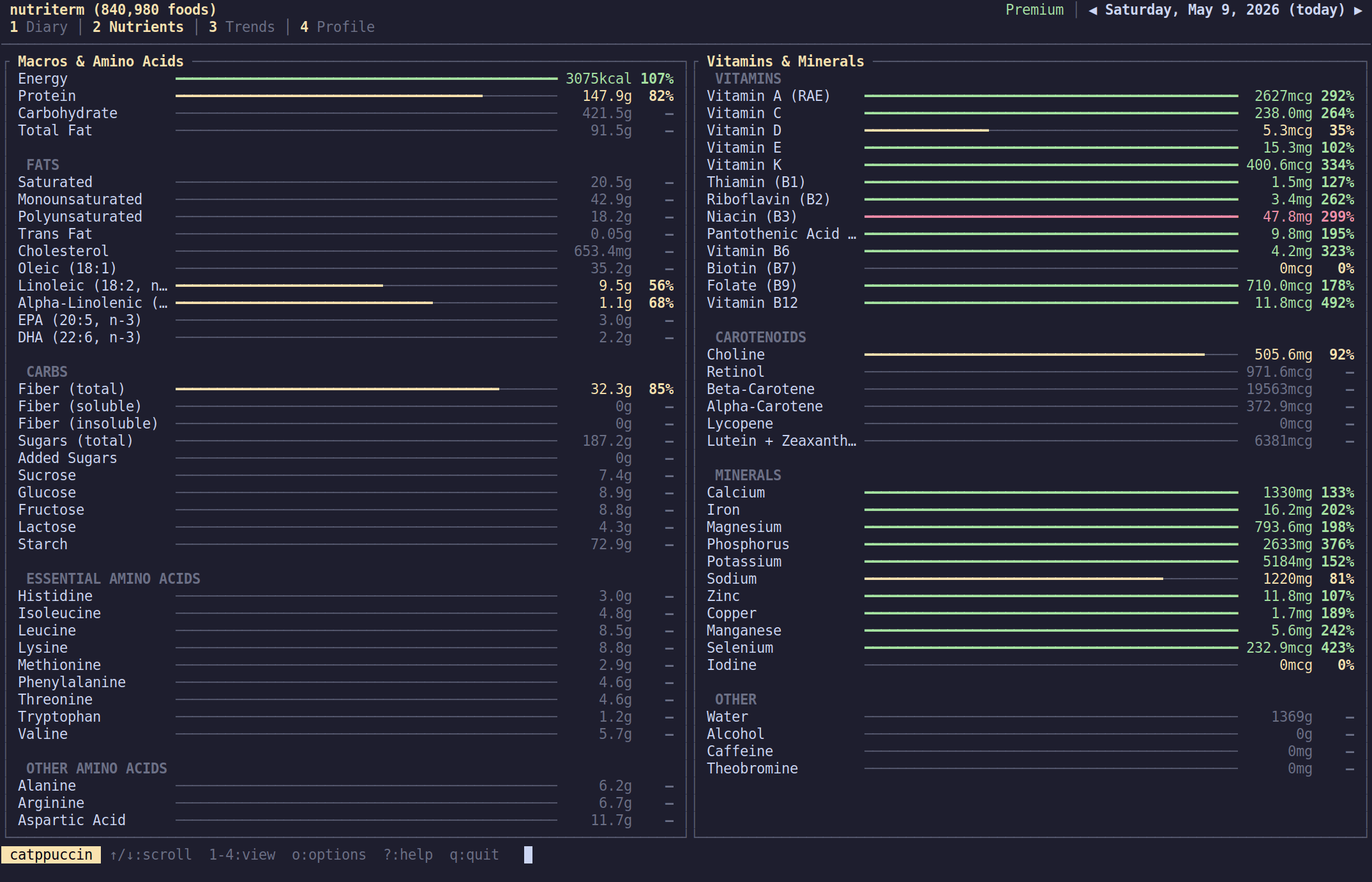
Nutrients
50+ vitamins, minerals, amino acids, and fatty acids — with RDA/UL targets.
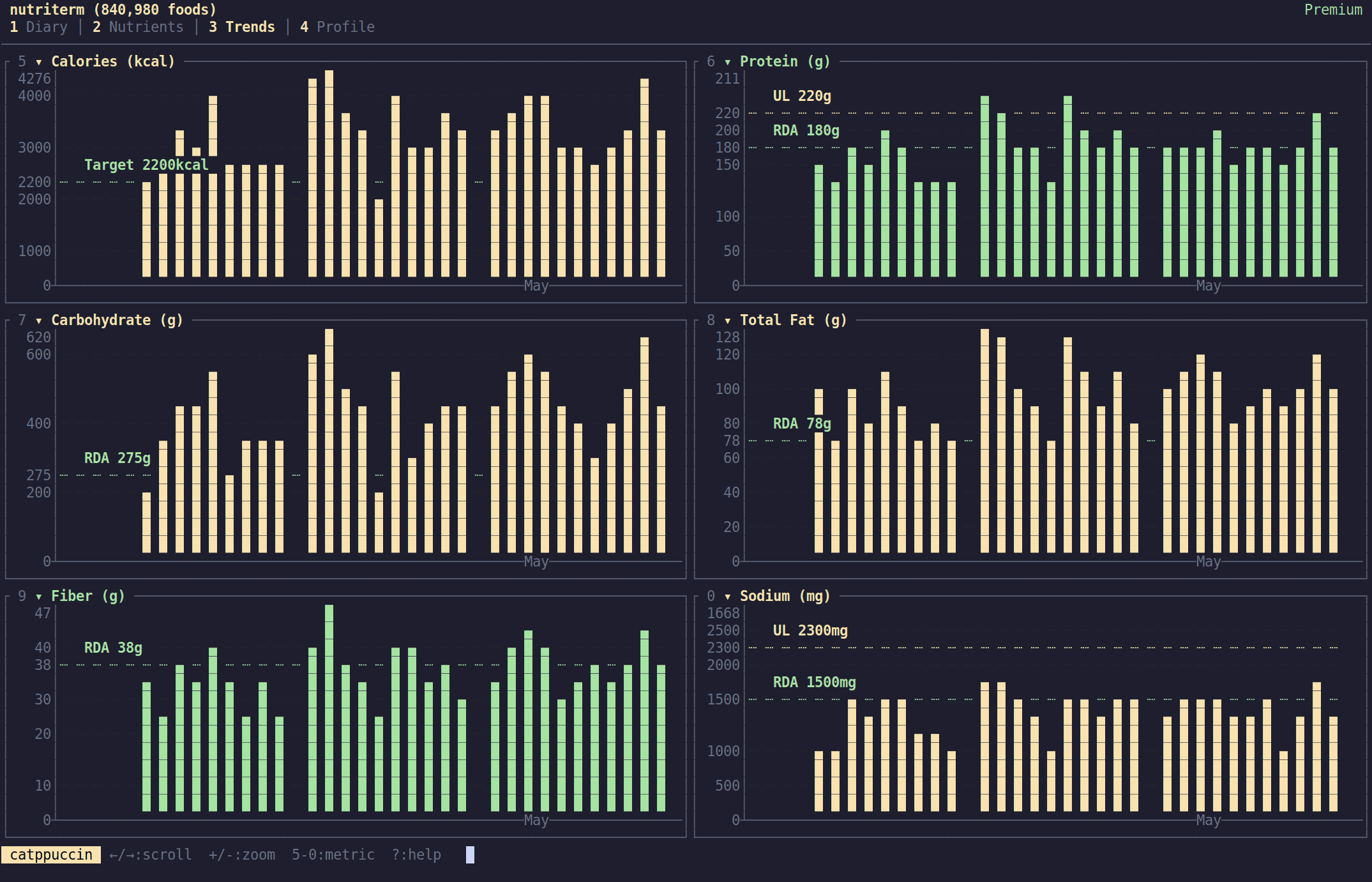
Trends
Configurable charts for any nutrient, weight, or water — over any time range.
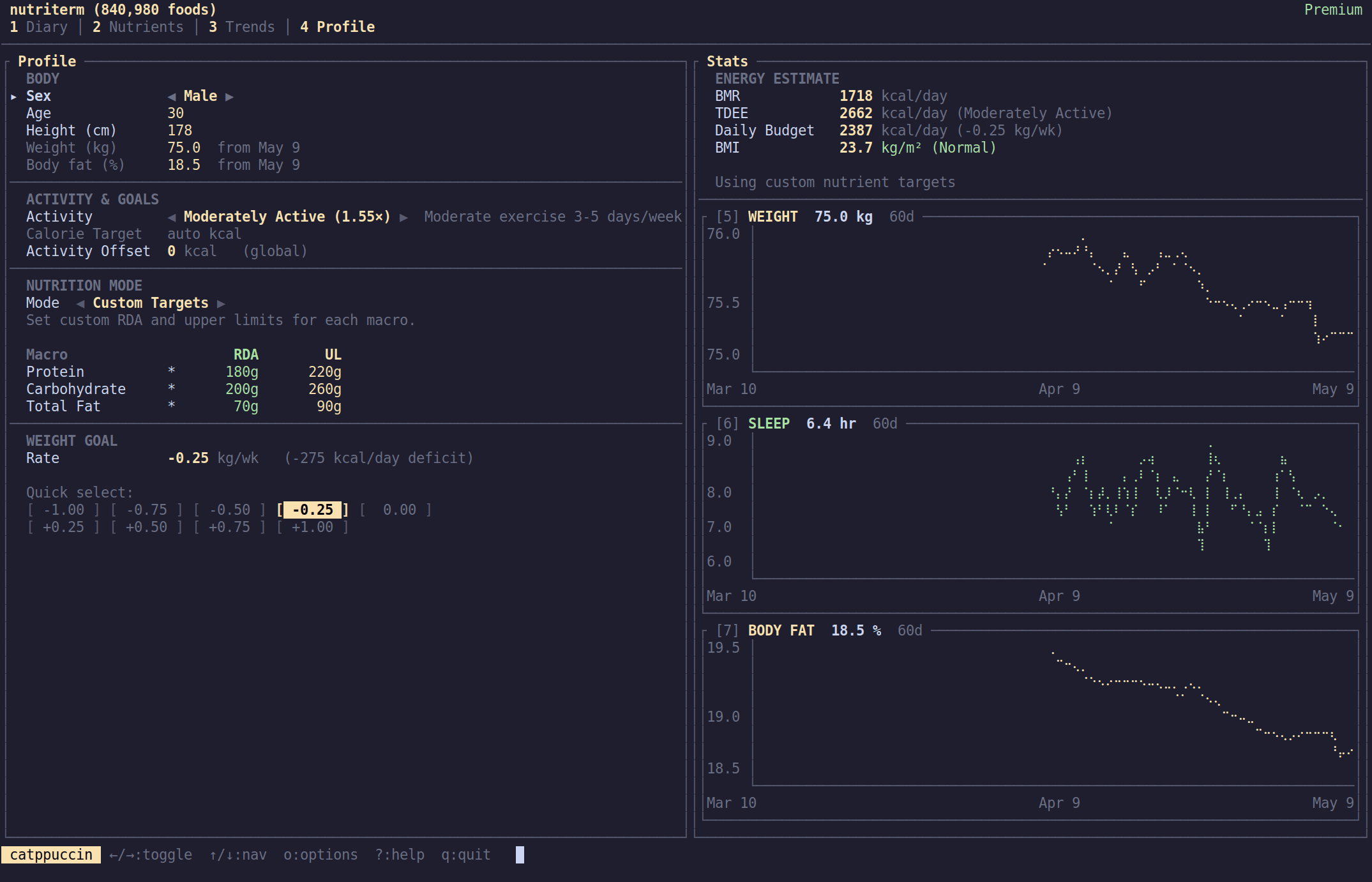
Profile
BMR, TDEE, macro targets, BMI, and a weight trend line chart.
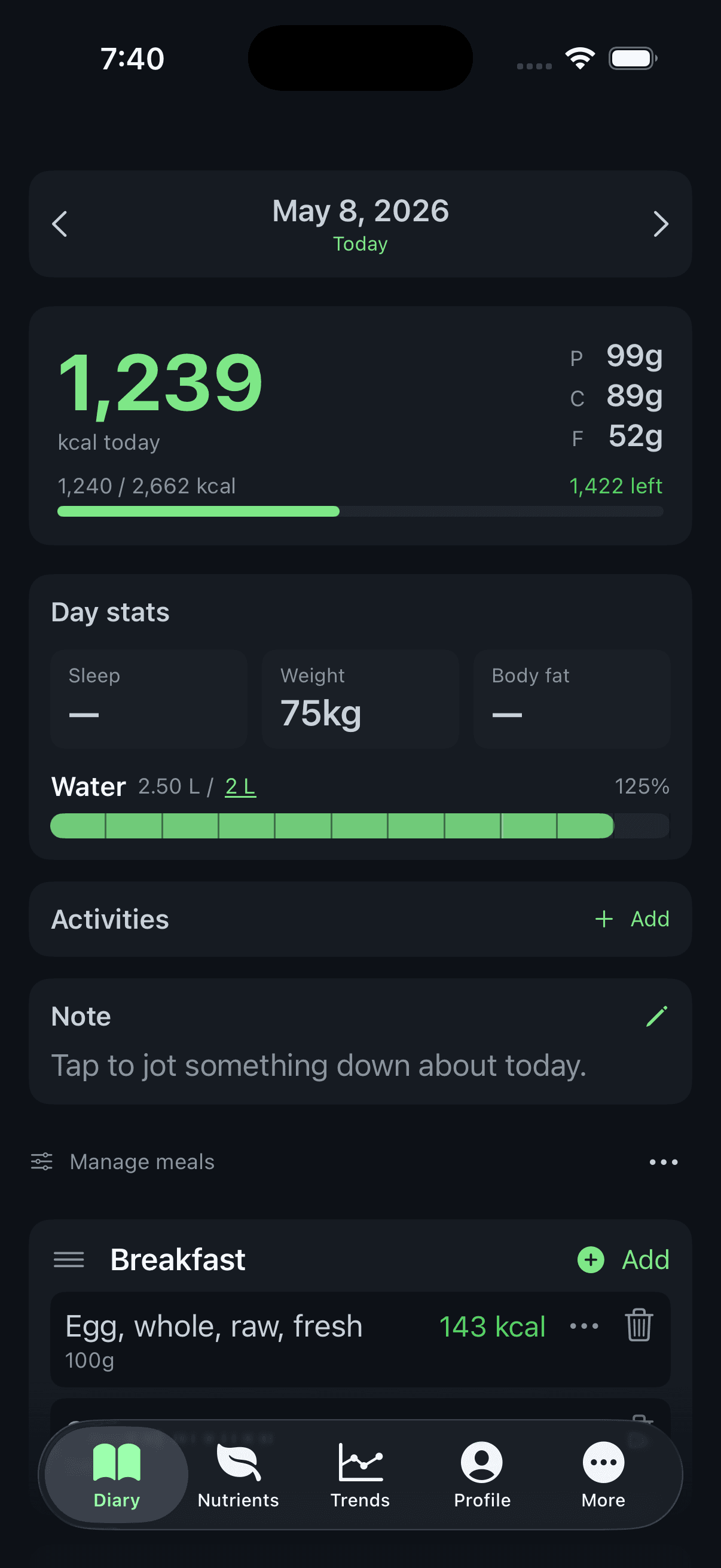
Also on web and mobile.
The same diary in a browser tab and in your pocket — with cloud sync, every client stays in step.
Everything you need. Without the bloat.
A full-featured nutrition tracker that respects your workflow, your privacy, and your wallet.
Terminal-First & Lightweight
Single binary, < 5MB, zero runtime dependencies. Launches instantly, runs anywhere a terminal does. No Electron, no browser, no bloat.
AI-Native by Design
Your nutrition data is just a plain SQLite file. Claude Code, Codex, Gemini CLI, and any AI agent can read, query, and update it directly — no APIs, no auth dance, no walled gardens.
840K+ Food Database
Powered by USDA FoodData Central. Fuzzy search with frequency ranking — foods you log often appear first.
50+ Micronutrients
Every vitamin, mineral, amino acid, and fatty acid. RDA/UL reference lines based on your age and sex.
Smart Calorie Budget
BMR via Mifflin-St Jeor, TDEE with activity presets, weight goal deficit/surplus — all calculated automatically.
Trend Charts
Configurable charts with multiple zoom levels. Track any nutrient, weight, or water over time.
Lightning Logging
Type a couple of letters, pick from frequency-ranked results, set your portion, done. Logging a meal takes seconds.
Water & Weight
Interactive water slider with configurable daily target. Daily weight logging with trend visualization.
Web, iOS & Android
Companion apps for the browser, iPhone, and Android share the same diary as the terminal. Premium keeps every client in sync; offline still works on each one.
One diary, every client
Premium adds cloud sync to the same terminal, web, and mobile apps you already use — log breakfast in the terminal, see it on your phone at lunch.
Premium keeps your diary, custom foods, weight log, and nutrient targets in sync across every client you use.
- >_TerminalmacOS · Linux · WSL2
- {}WebAny modern browser
- AndroidPlay Store
- iOSApp Store
- ≡Diary entriesMeals · water · activities
- +Custom foodsYour private database
- ↟Weight & body fatDaily metrics
- ◎Nutrient targetsPer-nutrient RDA / UL
Encrypted in transit and at rest. Your diary is yours — we have no reason to read it and no way to share it.
Edit on any client and the others catch up automatically. The latest change wins, so there's no merge UI to fight.
The terminal, Android, and iOS apps all keep working without an internet connection. Sync is the only thing Premium gates.
How we stack up
More features, more privacy, less cost.
| Nutriterm | MyFitnessPal™ | Cronometer™ | |
|---|---|---|---|
| Premium price | $3/mo · $15/yr (alpha) | $19.99/mo · $79.99/yr | $10.99/mo · $59.99/yr |
| Free tier | TUI + Web + Mobile | Limited | Limited |
| Footprint | < 5MB binary | Web + 100MB+ app | Web + 100MB+ app |
| AI agent friendly | Yes (local SQLite) | No | No |
| Open source | Yes | No | No |
| Terminal UI | Yes | No | No |
| Food database | 840K+ (USDA) | User-contributed | Curated + USDA |
| Micronutrients | 50+ | Limited (free) | 80+ |
| Custom targets | Per-nutrient RDA/UL | Macros only | Per-nutrient |
| CSV export | One click | Premium only | Premium only |
Pricing and features as of April 2026, based on publicly available information from each company's website. MyFitnessPal and Cronometer are trademarks of their respective owners and are not affiliated with Nutriterm.
Simple, honest pricing
Every client is free. Premium just keeps them in sync.
Free
Every client, every feature. Data lives on each device.
- >Full TUI (macOS, Linux, Windows)
- >Web dashboard in any browser
- >iOS & Android apps (coming soon)
- >840,000+ food database
- >50+ micronutrients
- >Trend charts & analytics
- >CSV export
- >Community support
Premium
Same apps, now synced. One diary, everywhere you are. Alpha pricing for early adopters while the product is still in active development.
- >Everything in Free
- >Cloud sync across all devices
- >Automatic cloud backup
- >Access your history from any client
- >Priority support
For context: MyFitnessPal Premium is $20/month. Nutriterm Premium starts at $1.25/month — no ads, your data stays yours.
Frequently asked
Still have questions? Ask them in the GitHub Discussions.
Do I need to be a developer to use this?
What platforms does it run on?
How does the AI integration actually work?
Do I need an AI agent to use Nutriterm?
Can I import my data from MyFitnessPal or Cronometer?
What happens to my data if Nutriterm shuts down?
Is everything really free?
What does Premium actually get me?
Ready to track smarter?
Install in seconds, on every platform you use. Free and open source forever.
macOS, Linux, or Windows via WSL2.